
Plugins
A plugin adds to Rahdar what Rahdar does not do itself: screens, an API, assistant tools, settings, background jobs and data of its own. It is one .jar, installed from Administration → Plugins. You see everything it will be able to do before anything is installed, and most plugins start without a restart.
A plugin is trusted code
A plugin runs inside Rahdar, with Rahdar's access to your brokers and database, and its screens act with the rights of whoever views them. Rahdar checks every jar thoroughly before installing it, but those checks stop accidents and misuse of the contract, not a determined attacker. Install plugins you would run as part of Rahdar itself.
Install a plugin
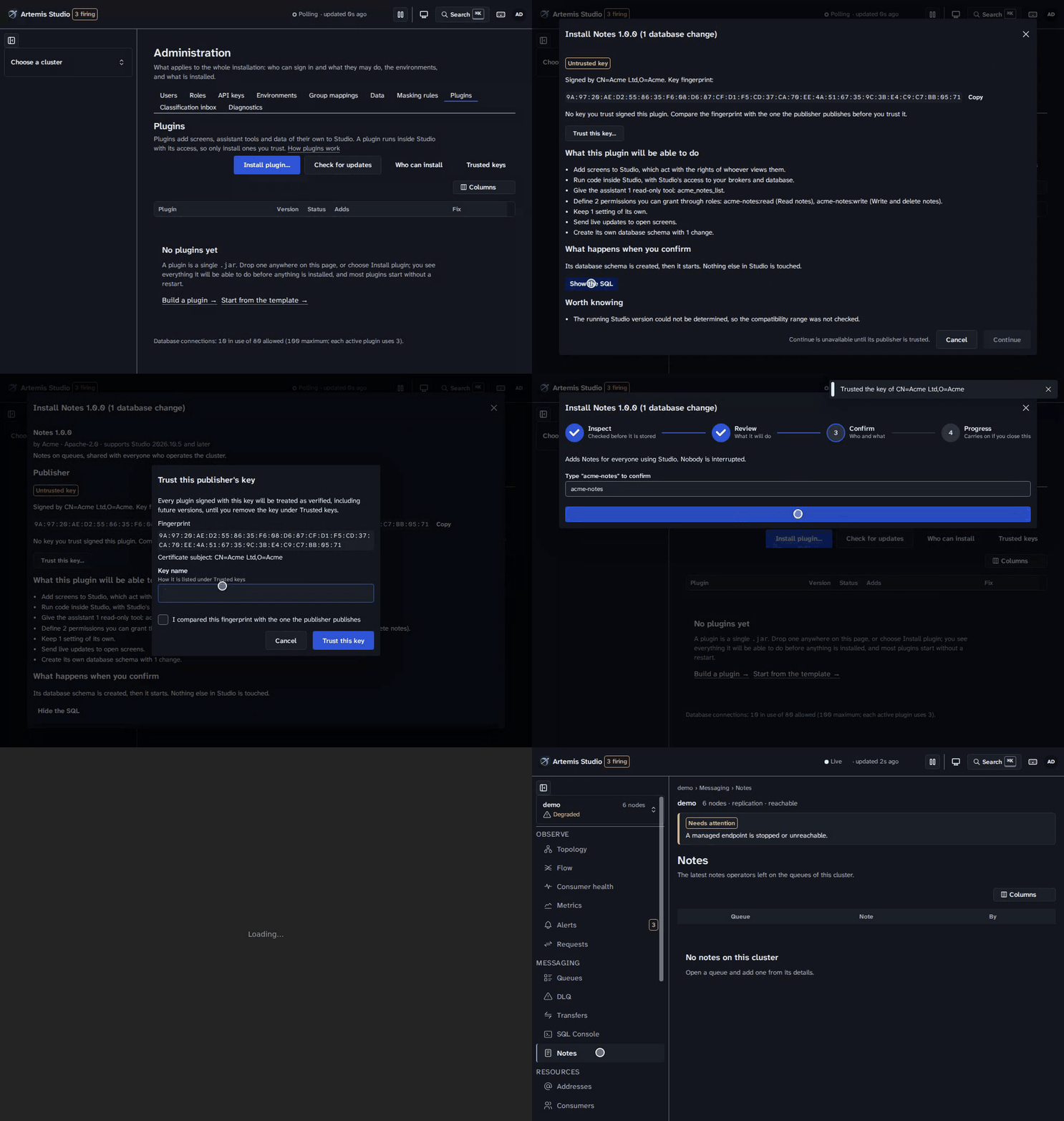
Drop the .jar anywhere on Administration → Plugins, or choose Install plugin. Four steps follow, and nothing is installed until the third:
- Inspect. Rahdar reads the jar without running any of its code. It checks the descriptor, every class, and every database change. If Rahdar would refuse the jar, you see every reason at once, each with what its author must change, and Copy report gives it to them. Nothing is stored.
- Review: what this plugin will be able to do. Each capability is stated as a sentence:
- screens, assistant tools (read-only or changing things), permissions and settings
- the database changes, with Show the SQL
- what it depends on
- for an update, what changes: permissions added or removed, and how many roles lose one
- Confirm. The review says who is affected and for how long. You confirm it is you (below) and type the plugin's id. The button names the exact action, for example "Update Notes to 1.5.0 (3 database changes)".
- Progress. A timeline follows the activation as it runs. You can close the dialog: the activation carries on, and the plugin's row shows where it has got to.
A plugin's screens appear after you reload Rahdar. Anyone else who has Rahdar open is told that plugins changed and offered a reload; nothing reloads on its own.
Confirming it is you
Anything that changes a plugin runs code on the server, so it needs a sign-in within the last five minutes:
- Password accounts re-enter their password. After five wrong attempts, the session ends.
- Single sign-on accounts sign in again at their identity provider, which asks for a fresh login. You return to where you were, with nothing you reviewed lost. The provider must report when you signed in (
auth_time). If it does not, the step-up is refused.
Uploading and reviewing need no confirmation, because nothing runs until you activate.
What needs a restart
Every change is classified before you confirm it, and does no more than it says:
| Class | When | What happens | Downtime |
|---|---|---|---|
| Instant | No database change is pending | The new version starts while the old one keeps serving. Requests switch over once it is ready, and the old version finishes its work and stops. If the new version fails to start, the old one keeps serving. | None |
| Brief maintenance | The update changes the plugin's database | For a few seconds that plugin alone answers "updating", while its work drains, its schema changes and the new version starts. | Seconds, that plugin only |
| Restart | The plugin says it needs one, or a version did not stop cleanly | The version to start is recorded and starts with Rahdar. | All of Rahdar, briefly |
When a restart is needed, Rahdar restarts itself if something will start it again. It stops gracefully: every plugin is closed and the stop is recorded as clean. Then it exits for its supervisor to restart it. That works:
- with the compose files, which set
RAHDAR_PLUGINS_RESTART_SUPERVISED=truenext torestart: unless-stopped. Keep those two together: remove one and you must remove the other. - on Kubernetes, which Rahdar detects.
- anywhere else, once you set
rahdar.plugins.restart.supervised=true, if your process manager restarts Rahdar when it exits.
Otherwise Rahdar does not stop itself. Exiting would leave it down, so it shows the command to run instead (docker compose restart rahdar). The review tells you in advance which of the two will happen.
Installers can also restart Rahdar from the Plugins tab, for example after a plugin that did not stop cleanly. That needs the same confirmation as any plugin change, and it is refused within two minutes of a start, so nothing can hold Rahdar in a restart loop.
Update and roll back
- Upload the new version the same way as a new plugin. The review shows the difference from the version installed. A plugin can only be updated by a jar from the same vendor, and never to an older version: use Roll back for that.
- Check for updates asks each plugin's update URL, if it names one, for a newer version. The check happens only when you ask; Rahdar never contacts anything on its own. An update is downloaded over https only, without following redirects, and must match the checksum its vendor published. Then it goes through the same inspection and review as an upload.
- Roll back reactivates the version that ran before, instantly, as long as the current version changed no database. A database change can't be undone reliably once data has been written under it, so after one, Roll back is unavailable and says why. The review warns about this before you confirm, and flags every change that has no rollback of its own: take a backup first.
Disable, uninstall, purge
| Its screens, API, tools, jobs | Its data | |
|---|---|---|
| Disable | Stop; Enable brings them back | Kept |
| Uninstall | Removed | Kept, so installing it again picks the data up |
| Purge (after Uninstall) | — | Deleted for good: its schema, the roles' grants of its permissions, its saved settings, its stored jars |
Purge shows its reach first: each table with its approximate rows and size. You then type the plugin's id. If another plugin requires the one you are disabling, Rahdar says which and offers to disable them together.
Who can install plugins
Installing a plugin runs its code, so this is not a role permission. No role and no wildcard permission lets anyone install, not even one that can edit every role. Instead a short list of installers can. It is checked on every request, so removing someone takes effect on their next click.
- The administrator Rahdar creates on first start is the first installer.
- Or name them in
rahdar.plugins.initial-installers, as a username, or<registration-id>:<subject>for a single sign-on user. This list is used only while nobody is an installer; after that, installers manage installers. - An installer adds or removes others under Who can install on the Plugins tab, after confirming it is them. The last installer cannot be removed.
- Administrators who are not installers see everything, with the actions disabled and the reason beside them.
Plugins are only ever changed from a browser session. API tokens and the MCP endpoint are refused, even an installer's.
Licenses
A plugin that is sold can say it needs a license. Rahdar then shows its license state on the Plugins tab, and a License tab in the plugin's drawer. Rahdar stores the file you upload, but it does not read it: the plugin decides whether it accepts the file, and tells Rahdar. A plugin that does not need a license shows none.
| State | Meaning |
|---|---|
| No license | The plugin needs one and none is uploaded. |
| Not checked yet | A file is stored and the plugin has not said what it makes of it. |
| Licensed | The plugin accepted it. |
| License expiring | Accepted, and it ends within 30 days. |
| License expired | It has ended. |
| Over its license limit | The plugin is used beyond what the license allows. |
| License not accepted | The plugin did not accept the file; its note says why. |
- Upload, replace or remove a license on the plugin's License tab. Like any change to a plugin, it needs an installer who has signed in within the last five minutes. A license file is at most 64 KB.
- What a plugin does without a license, or once one expires, is its own rule; the plugin's documentation says. Nothing else in Rahdar is affected, and a plugin that fails while checking its license affects no other plugin.
- Health. While a running plugin that needs a license has none, has one it did not accept, or has one that ends within 30 days,
/actuator/health/rahdarreportspluginLicensesasDEGRADEDand names the plugin. It is never part of readiness. - Audit. Every upload, replacement and removal is recorded with who did it, the plugin, and the file's SHA-256 and size. The content of the file is never recorded.
- The file is signed by whoever issued it, not secret, so it is stored as is. Anyone who can read Rahdar's database can read it.
Signing and trust
A plugin runs with Rahdar's own access, so Rahdar checks who built it before anything runs. Every plugin jar is signed by its publisher with a key, and Rahdar installs a jar only if it is signed by a key an installer has trusted. The signature also proves the jar was not changed afterwards: a file altered, added or removed after signing is refused before anything is stored.
- Trusted keys. Under Trusted keys on the Plugins tab, installers add the publishers' keys (a PEM certificate or public key, which the publisher publishes) and remove them. Each key shows its fingerprint, the name you gave it, and the plugins it signed. Adding or removing a key needs a fresh sign-in, like any plugin change, and is audited.
- Keys from configuration. An installation that is built from files, such as an air-gapped one or one managed by GitOps, pins its publishers' keys in
rahdar.plugins.trusted-keysinstead. See Pin keys by configuration. - Trust this key. Upload a plugin from a publisher you have not trusted yet and the review names its key by fingerprint and certificate subject. Compare that fingerprint with the one the publisher publishes (on their site, in their release notes), tick that you did, and choose Trust this key. Rahdar takes the key from the uploaded jar itself, adds it and re-checks the review. Never trust a fingerprint you only read in the same place you got the jar.
- Signer changes. An update may be signed by a different trusted key than the installed version. The review then shows the old and the new fingerprint, and you must confirm the change before activating. Likewise, an update that asks for a new permission highlights it and needs your confirmation. Rahdar enforces both on the server; a client that skips the confirmation is refused.
- Unverified plugins. By default a plugin that is unsigned, or signed by a key nobody trusts, cannot be installed, updated, rolled back to or enabled. An installer can switch on Allow unverified plugins in Trusted keys. It is off by default, changing it needs a fresh sign-in and is audited, and every activation it allows records
trust=unverifiedand the fingerprint in the audit log. Such a plugin shows an Unverified badge, and needs the same confirmation on activation. - Sign-in plugins. A plugin that offers a sign-in receives users' passwords, so Allow unverified plugins never covers it: it needs a trusted key, and its install or update needs a separate confirmation. See Sign-in providers.
- Removing a key. Plugins the key signed keep running, so removing a key never takes a plugin down, but they show the Unverified badge at once, and their next update is refused unless a trusted key signed it.
- Health. While any installed plugin is unverified, the
rahdarhealth group in/actuator/health/rahdarreports DEGRADED and names the plugins, so a monitor notices. It returns toUPwhen the plugin is updated by a trusted key, its key is trusted again, or it is removed.
Pin keys by configuration
Each item of rahdar.plugins.trusted-keys has a name, which the Trusted keys dialog shows, and a pem: the publisher's PEM certificate or public key, the same text you would paste into the dialog.
rahdar:
  plugins:
    trusted-keys:
      - name: Example Publisher
        pem: |
          -----BEGIN CERTIFICATE-----
          MIIB...
          -----END CERTIFICATE-----
As environment variables, with the item's number between underscores, for example in a compose file:
environment:
  RAHDAR_PLUGINS_TRUSTED_KEYS_0_NAME: Example Publisher
  RAHDAR_PLUGINS_TRUSTED_KEYS_0_PEM: |
    -----BEGIN CERTIFICATE-----
    MIIB...
    -----END CERTIFICATE-----
Rahdar makes the trusted keys agree with the list every time it starts, before any installed plugin is started, so a plugin signed by a configured key is trusted on the first boot with it.
- A configured key is added and shows From configuration. A key an installer added by hand with the same fingerprint becomes a configured one.
- Its Remove is disabled, and the API refuses with 409 (
configured-key): change the configuration and restart. - Remove a key from the list and restart, and it is no longer trusted. The plugins it signed keep running, show the Unverified badge, and the
rahdarhealth group reports DEGRADED, as for any removed key. Keys an installer added by hand are never touched. - A bad entry stops Rahdar from starting: a missing
nameorpem, a key that is not a PEM certificate or public key, or the same key twice. The message names the entry's number (trusted-keys[1]) and the reason. - Every key it adds or removes is audited as
PLUGIN_KEY_ADDorPLUGIN_KEY_REMOVEby the actorconfiguration, with the fingerprint.
Whoever can change Rahdar's configuration can trust a publisher this way, without a fresh sign-in. They could already run anything in Rahdar, but treat the list like the rest of your deployment's secrets.
Trust is the key, not the certificate: a publisher who re-issues their certificate for the same key needs nothing done. There are no certificate chains, expiry dates or revocation lists, so if a publisher's key is compromised, remove it. Plugin authors: see Sign your plugin.
Security, in short
- Checked before it is stored. Rahdar reads the whole jar's bytecode without loading it.
- Refused shapes: unexpected files; archive tricks such as duplicate or escaping entries, oversized entries and extreme compression ratios; and manifest attributes that change how the JVM loads code.
- Confinement: classes outside the plugin's own package, and names outside its namespace.
- Refused calls:
System.exit, starting processes,@Scheduled,@Async, and database changes that run a command or a Java class.
- Its data is its own. Each plugin has its own database schema and a pool of 3 connections. It may not create anything in Rahdar's schema or reference Rahdar's tables. Activation fails if it tries, and the previous version resumes.
- It uses Rahdar's permissions. A plugin's API sits behind Rahdar's sign-in, and its permissions are granted through roles like any built-in's.
- Everything is audited. Every upload, activation, change and removal is in the audit log with who, from where, the jar's checksum and the outcome. Each step is also written to Rahdar's log, because a plugin shares Rahdar's database role and could, in principle, change the audit table.
- The kill switch.
rahdar.plugins.upload.enabled=falseswitches installing and updating off. Installed plugins keep running, and can still be disabled and removed.
Capacity
Each active plugin takes up to 3 database connections, next to Rahdar's own 16 (the pool size, RAHDAR_DB_POOL_SIZE). Activation is refused, with the reason, once that would exceed 80% of Postgres' max_connections. The Plugins tab shows the current count.
When a plugin stops, its classes should leave memory. If a stopped version is still in memory a minute later, the Plugins tab says so and recommends a restart. The compose files cap metaspace at 384 MB (-XX:MaxMetaspaceSize=384m), so a plugin that does not unload cleanly fails loudly rather than growing without limit.
Configuration
| Property (environment variable) | Default | |
|---|---|---|
rahdar.plugins.upload.enabled (RAHDAR_PLUGINS_UPLOAD_ENABLED) | true | false switches installing and updating off |
rahdar.plugins.initial-installers | — | Who can install while nobody can: usernames or registration-id:subject |
rahdar.plugins.restart.supervised (RAHDAR_PLUGINS_RESTART_SUPERVISED) | unset: true on Kubernetes | Something starts Rahdar again after it exits |
rahdar.plugins.trusted-keys (RAHDAR_PLUGINS_TRUSTED_KEYS_0_NAME, ..._0_PEM) | none | Publisher keys to trust, each a name and a pem; see Pin keys by configuration |
rahdar.plugins.safe-mode (RAHDAR_PLUGINS_SAFE_MODE) | false | Start without any plugin |
rahdar.plugins.start-timeout-seconds | 60 | How long a plugin gets to start |
rahdar.features.plugins.enabled | true | false removes the Plugins tab and its API; installed plugins still run |
When something goes wrong
A plugin can never stop Rahdar from starting. Rahdar is already serving before any plugin starts, and each plugin starts on its own, within a time limit.
| What you see | Why, and what to do |
|---|---|
| "This jar cannot be installed", with a list | Rahdar would refuse it. Nothing was stored. Copy report for the plugin's author. |
| Failed, with a reason | It did not start. If an update failed, the previous version kept serving. Retry, upload a fixed version, or uninstall. |
| Failed: "schema at version X" | The update changed its database, the new version then failed to start, and the change could not be undone. Upload a fixed version, or restore from backup. |
| Incompatible | It does not support this version of Rahdar (its since/until). Update the plugin, or uninstall it. It becomes active again by itself if Rahdar moves back into its range. |
| Restart required | See What needs a restart. |
| Refused: "another plugin operation is in progress" | One change at a time, across all plugins. Wait for it to finish. |
| Refused: connection budget | Disable another plugin, or raise Postgres' max_connections. |
| A plugin's page says it could not show its screens | The plugin is running, but its UI failed to load in this browser. The rest of Rahdar is unaffected. Reload, then check the plugin's row. |
| Safe mode: no plugin is running | Rahdar stopped uncleanly three times in 15 minutes, so it started without plugins. Or safe-mode is set. Fix or remove the plugin that failed, then restart normally. |
Build a plugin
Start from the template: examples/plugin-template. It is a complete plugin, Notes, notes operators leave on queues, with every kind of contribution:
- an entity in its own schema, with a reversible changelog
- an audited service
- an API behind Rahdar's permissions
- an assistant tool
- a setting and a background job
- a metric with a default alert rule
- a page in every cluster, a navigation entry, a panel in every queue's details, and live updates
mvn verifyThat builds the plugin into one jar: descriptor, classes, database changes and UI. Then it checks the jar exactly as Rahdar will on upload, so a refusal shows up in your build, not in front of an operator.
What a plugin builds against:
- Java.
io.github.sudoitir:rahdarfrom Maven Central,provided. Use only the types marked@PluginApi: those are kept stable within a contract version. Anything else can change in any release. - UI.
@rahdar/plugin-sdkfrom npm. Its Vite preset,rahdarPlugin({ id }), builds a Module Federation bundle that takes React, Mantine and TanStack from Rahdar, so one bundle is small and matches Rahdar's look. - Versions. Build against the Rahdar and SDK version of the oldest Rahdar you support. It becomes your
rahdar.since, and Rahdar refuses the plugin on anything older.
The rules Rahdar enforces (the template's README explains each):
- Its namespace. One id, lowercase kebab-case with your organisation first (
acme-notes), prefixes everything the plugin adds:- its API:
/api/v1/p/<id>and/api/v1/clusters/{clusterId}/p/<id> - its routes:
p/<id>/… - its permissions (
<id>:…), settings (<id>.…), live topics and assistant tools (<id_in_snake_case>_…)
- its API:
- Its own package. Classes live only under its
basePackage. A library it bundles must be shaded and relocated under it. - Rahdar runs its threads. No
@Scheduled,@Asyncor threads of its own: contribute aScheduledJob, and Rahdar runs it and stops it with the plugin. A job's scope says where it runs when several Rahdar instances share one database:INSTALLATIONjobs (pruning, housekeeping, anything on shared rows) run on one instance per tick, andINSTANCEjobs (flushing a buffer, refreshing a cache) run on every instance. - Changes are audited. Audit every change with
AuditService, like Rahdar's own features do. - Its data is its own. Its tables live in its own schema, with no foreign keys to Rahdar's. Give every changeset a rollback, or updates that apply it cannot be rolled back.
Assistant tools
A plugin's @McpTool beans join Rahdar's MCP endpoint while it runs. Declare each one in plugin.json, and Rahdar checks its permission before your code runs:
"mcpTools": [
  {
    "name": "acme_notes_list",
    "posture": "read",
    "scope": "cluster",
    "permission": "acme-notes:read",
    "description": "Lists the notes on a queue.",
    "params": [{ "name": "order", "values": ["newest", "oldest"], "note": "Defaults to newest." }]
  }
]permissionis one of the plugin's own permissions. It is checked against the API key's owner, as it is for every other call.scopeis the scope of the permission, and Rahdar refuses a tool whose scope differs.scope: resourcechecks it on the queue or address named by the argumentresourceArg(a required string the tool takes), of the kindresourceKind(queueoraddress), on the cluster named by the required stringclusterId. A caller who may not read that queue or address is told No such queue or address, or this key has no grant on it, whether or not it exists, and one who may read it and may not use it is told which permission is missing.scope: clusterchecks it on the cluster named by the tool'sclusterIdargument, which the tool must take as a required string. A caller without the grant is told No such cluster, or this key has no grant on it, exactly as for Rahdar's own tools, so the cluster's existence stays hidden.scope: globalchecks it globally, and a denial names the permission.postureisreadorwrite. Annotate areadtool@McpTool.McpAnnotations(readOnlyHint = true), and awritetool not: hosts decide from that annotation whether to ask the operator first.paramsare the accepted values, body shapes and notes your schema leaves out.rahdar_helpshows them, with the permission and scope, to any model that asks.
Rahdar refuses to activate a plugin whose registered tools and declared tools differ, whose cluster or resource tool takes no clusterId (or a resource tool no resourceArg), or whose annotations contradict its posture. Check finer rules (such as a second permission for sensitive fields) inside the tool as usual.
Messages and secrets
A plugin can react to messages, send them and keep credentials without a client, thread or store of its own. Inject the two beans Rahdar puts into every plugin's context; each is bound to that plugin and acts only on its own data.
PluginMessaging registers what the plugin wants delivered, and Rahdar makes it true on every serving node, after every restart and failover, and undoes it when the registration is removed or the plugin stops running:
@Component
class Orders implements PluginMessageHandler {

    Orders(PluginMessaging messaging, ...) { ... }

    void watch(UUID clusterId, UUID operatorId) {
        messaging.register(new RegistrationSpec(
                "orders", clusterId, "ORDERS.IN", RegistrationMode.TAP, 1, operatorId));
    }

    @Override
    public Disposition onMessage(PluginMessage message) {
        // message.body(), .headers(), .properties(), .deliveryCount()
        return Disposition.ACCEPT;
    }
}TAPdelivers a copy of every message routed to the queue. Existing consumers and producers are untouched. If the plugin falls behind, the oldest copies are dropped, andregistration(key).droppedCopies()says how many. It needs the acting user to holdmessage:readon the queue, and Rahdar's broker role to be set (rahdar.capture.broker-role, as for capture).CONSUMEmakes the plugin one of the queue's consumers.ACCEPTremoves the message.REJECT, an exception, or the plugin stopping first leaves it for redelivery, within the broker'smax-delivery-attempts.RELEASEalso leaves it on the queue, but without spending a delivery attempt: return it when the message is not the problem (the service your handler calls is down) and you are stopping the registration until it recovers. The broker offers a released message again at once, so releasing in a loop that keeps receiving only spins. It needsmessage:readandqueue:purgeon the queue.send(OutboundMessage)sends a body, headers and properties to an address. It needsmessage:sendon the address.checkSend(clusterId, address, actingUserId)answers why such a send would be refused (a reserved address, an unknown cluster, a missingmessage:send) without sending, so a plugin can reject a bad target when a user configures it.sendstill checks every message.- Every registration acts for a user, whose rights on the queue or address (through a role, a team or a share) are checked when it is made and on every pass after (
rahdar.plugins.messaging.reconcile-interval, 10 s by default). If the user loses a permission, the registration isSUSPENDEDand says why. It resumes when the permission returns. - Concurrency. A registration's
concurrencyis how many messages the handler gets at once on each serving node: 1 to 32 forCONSUME, exactly 1 forTAP. Rahdar opens that many consumers per node. Any other value is refused, with the reason. - Flow control. A
CONSUMEregistration's consumers have no prefetch window (the Core client'sconsumerWindowSize=0): the broker hands a consumer its next message only once the last one is settled. At mostconcurrencymessages per node are delivered and unsettled, the rest stay on the queue for any other consumer, and a slow handler is simply handed fewer messages. Nothing buffers in Rahdar or in the plugin. - Order. With a concurrency above 1, messages are handled in parallel, so their order is not kept, except within a message group. Producers that set the same
JMSXGroupID(_AMQ_GROUP_IDin Core) on related messages get them handled one at a time, in order, on each node: the broker hands every group to one consumer. For an order across a broker cluster's nodes, configure the broker's grouping handler. A concurrency of 1 keeps the queue's order on each node. - Threads. Rahdar calls the handler on threads of its own, from a pool that only plugin handlers use: at most
rahdar.plugins.messaging.max-threads(64 by default, at least 2) per node for consumers, and as many for taps. A handler that blocks holds its own consumer and a thread of that pool, never a thread message capture or an operator's session needs. Keep it bounded all the same: blocked handlers across plugins share the pool, and one registration's footprint is itsconcurrencythreads per node. - Queues under Rahdar's own prefixes and the broker's management addresses are refused.
PluginSecrets stores named values encrypted with Rahdar's secret key: put, get, delete and list (names and dates only). No Rahdar interface returns a value, and a plugin should keep it that way: accept secrets, never echo them. Purging the plugin deletes them.
Metrics and alerts
A plugin publishes numbers an operator watches through Rahdar's own metrics: the time series, its charts, Prometheus and the alert rules. Nothing parallel is needed on either side.
Declare each metric in plugin.json, with the permission that reads its series:
"metrics": [
  { "name": "acme-notes:notes", "description": "Notes per queue.", "unit": "count",
    "subject": "queue", "permission": "acme-notes:read" }
],
"alertRules": [
  { "key": "many-notes", "name": "Many notes on a queue", "metric": "acme-notes:notes",
    "comparator": "GT", "threshold": 50, "forSeconds": 0, "severity": "INFO" }
]
Answer for it with a PluginMetricSource bean, which returns the current value per subject:
@Component
class NoteCounts implements PluginMetricSource {
    public String metric() { return "acme-notes:notes"; }
    public Map<String, Double> sample(UUID clusterId) { return counts.perQueue(clusterId); }
}- When. Rahdar asks on every tier-B scrape of a cluster (every 15 s by default). A call that throws or takes longer than two seconds is skipped for that scrape, so answer from what the plugin already holds rather than from a slow query.
- Where it goes.
- The values are stored with the queue metrics and share their retention.
- Prometheus shows them as
rahdar_plugin_metric{plugin, metric, cluster, subject}. - Each value is per Rahdar instance.
- Rules. Threshold rules can watch the metric, with Rahdar's comparators, durations, severities and channels. A scope's
subjectPatternnarrows a rule to some subjects.alertRulesare created once on every cluster, when the plugin first runs and for clusters registered later. An operator's edit or deletion is never undone.- While the plugin is not running, its rules show "source unavailable" and do not fire.
- Charts.
MetricChartfrom the SDK draws Rahdar's own chart of one subject:<MetricChart clusterId={id} metric="acme-notes:notes" subject="orders" title="Notes" />. The reader needs the permission the metric declares.usePluginSeriesreturns the same series as data. - A source for a metric
plugin.jsondoes not declare refuses activation, and a metric read with a permission the plugin does not declare refuses the upload.
Offer updates by naming an updateUrl (https) in plugin.json that answers:
{ "version": "1.5.0", "url": "https://acme.example/acme-notes-1.5.0.jar", "sha256": "…", "changeNotes": "…" }Rahdar asks only when an installer chooses Check for updates. It downloads the jar without following redirects, and refuses it unless it hashes to that sha256.
Licensing
A plugin that needs a license says so in plugin.json, and Rahdar stores the file an administrator uploads and shows the plugin's verdict. Rahdar never reads the file and knows no license scheme: reading it, checking it and deciding what an invalid one means are the plugin's.
"requiresLicense": trueInject PluginLicense, which Rahdar binds to the plugin like PluginSecrets:
@Component
class Licensing {

    private final PluginLicense license;

    Licensing(PluginLicense license) { this.license = license; }

    /** Runs when the file is uploaded, replaced or removed, on every Rahdar instance. */
    @EventListener
    void onChanged(PluginLicenseChanged changed) {
        if (!changed.pluginId().equals("acme-notes")) {
            return;
        }
        license.file().ifPresentOrElse(
                file -> license.report(file.sha256(), judge(file.content())),
                () -> { /* no license: act as your own rules say */ });
    }
}file()is the plugin's own stored file: itscontent(), itssha256()and when it was uploaded. It is empty when there is none. A plugin can read only its own file.report(sha256, verdict)says what the plugin made of that file: a status (VALID,EXPIRED,OVER_LIMITorINVALID), when it ends, who it was issued to, and a short detail for the administrator (such as why a file is invalid). The licensee is cut at 200 characters and the detail at 500. Rahdar ignores a report whosesha256is not the stored file's, so a late report never marks a replaced file valid. Never put the file's content in the detail.PluginLicenseChangedreaches the plugin on every Rahdar instance when its file is uploaded, replaced or removed. Every plugin receives it, so comparepluginId()with your own. Check your license when the plugin starts and on a timer as well: an expiry is a moment, not an event.- Rahdar shows
Not checked yetuntil the plugin reports, and its health degrades after five minutes, so report every file you are given, including one you reject. RahdarInfo.brokerInstances()is the number of broker nodes registered in the installation, a count with no names, for a license that is sized by it.- Rahdar is not affected by a plugin's verdict, and a listener that throws is logged and isolated. Keep a license check cheap and never block on it.
Sign-in providers
A plugin can offer a username-and-password sign-in, for a corporate directory for example. It answers who the credentials belong to; everything else on the sign-in path stays Rahdar's: the login throttle, the account lockout, second factors, the session, the audit trail and the group mappings.
Declare each provider in plugin.json, with the label the login screen shows:
"identityProviders": [
  { "id": "acme-notes:corp", "label": "Corporate directory" }
]
Answer for it with one PluginCredentialProvider bean per declared id:
@Component
class CorporateDirectory implements PluginCredentialProvider {
    public String id() { return "acme-notes:corp"; }

    public Optional<VerifiedIdentity> authenticate(String username, String password) {
        return directory.bind(username, password)
                .map(u -> new VerifiedIdentity(u.uid(), u.login(), u.mail(), u.groups()));
    }

    // Optional: which of these users has the directory lost? Called about every five minutes.
    public Set<String> noLongerValid(Set<String> subjects) { return directory.missing(subjects); }
}- What Rahdar does with the answer. An account is keyed by the provider id and
subject, so it must not change for a user. The first sign-in creates the account withusername; a name another account already has is stored asname@<provider id>, and the provider is still asked about plainname. Grants come only from Group mappings on the provider's groups (or its default role): a provider cannot hand back a user id or grants, and a user matching no mapping is refused. - A wrong password is an empty answer. It is answered, throttled and counted toward the lockout exactly like a wrong local password. A throw, an answer that is not valid (a blank subject or username, a field over 255 characters, more than 1,000 groups) or no answer within 5 seconds is treated the same, and
/actuator/health/rahdarreports DEGRADED, naming the provider and the reason, until a call succeeds. Local sign-in never waits on a plugin. - Only a verified plugin may sign users in. A plugin that declares a provider is installed only when a trusted key signed it, even with Allow unverified plugins on. Installing it, or updating it to add a provider, needs a confirmation (
signin-added) and the review says the plugin will receive the passwords users type. If its key is later removed, the plugin keeps running but its providers stop signing anyone in at once. - Revoking access. When the provider implements
noLongerValid, Rahdar asks it about the enabled accounts of the provider and, for every subject it returns, ends the user's sessions, revokes their API tokens and trusted devices and auditsIDENTITY_REVOKED. The account stays enabled, so a user restored in the directory signs in again. This pauses while the plugin is stopped, and stopping or updating a plugin does not sign anyone out. - Second factors. A role that requires a second factor applies to these users like local ones: they enrol at their first sign-in and then give a code after the password. Their password is changed where the directory keeps it, not in Rahdar.
- Redirect (OIDC-like) providers, bearer providers and changing Rahdar's throttling, lockout or session rules are not available to plugins.
Approval providers
A plugin can decide whether Rahdar's gated operations may run, for example by holding them until a second person approves. Declare it in plugin.json, naming the permission the people who approve hold, which must be one the plugin declares under permissions:
"approvalProvider": { "approverPermission": "acme-notes:approve" }Then expose one ApprovalProvider bean. A plugin that declares the block without the bean fails its activation. A plugin may also contribute GatedOperation beans for its own operations; each type is named <plugin id>:<name>, and no two operations share a type or a parameters record.
- Only one provider. Activating a second plugin that declares
approvalProviderwhile another is meant to be active is refused (approval-provider-exists), naming the first. Disable or uninstall it first. - The gate follows what is meant to be active, not what is running. From the moment the provider is being installed, and while it is starting, has failed, needs a restart or is incompatible with this Rahdar, gated operations are not run and the caller is told approvals are unavailable. Only disabling or uninstalling the provider disarms the gate. Updating or rolling back the provider keeps it armed.
- Removal is announced. Disabling or uninstalling the provider publishes a
PluginStatusChangedevent inside the same transaction, so what depended on it is cancelled together with its removal. - Rahdar logs
approval-gateat INFO when it boots and whenever the gate arms or disarms.
The approver's page. Rahdar's own Approve and Reject sit on every request's page. A provider that needs more of the approver, such as its own checks or a second signature, contributes to the approval.decision slot, which renders above them with the request (heldOperation) and a refresh to call once the provider changed it. A vote needs a fresh sign-in, and StepUpPrompt asks for one when the plugin's endpoint refused for that reason:
import { useMutation } from '@tanstack/react-query';
import { Button, Stack } from '@mantine/core';
import { pluginApi, request, StepUpPrompt, type SlotProps } from '@rahdar/plugin-sdk';

function SecondSignature({ heldOperation, refresh }: SlotProps['approval.decision']) {
  const sign = useMutation({
    mutationFn: () => request(pluginApi(ID, `requests/${heldOperation.operation.id}/sign`), { method: 'POST' }),
    onSuccess: refresh,
  });
  if (!heldOperation.canDecide) return null;
  return (
    <Stack gap="xs">
      <Button onClick={() => sign.mutate()} loading={sign.isPending}>
        Add my signature
      </Button>
      <StepUpPrompt error={sign.error} returnTo={location.pathname} />
    </Stack>
  );
}

// in definePlugin({ … }):
slots: {
  'approval.decision': [{ id: `${ID}.signature`, order: 10, title: 'Second signature', Component: SecondSignature }],
},
A mutation anywhere in a plugin's UI can be held too: its error is then an OperationHeldError, and notify.settle(error, …) turns it into the "sent for approval" toast with a link to the request instead of a failure. Queries under heldOperationsKey refresh by themselves: the shell holds the user's own stream open on every page. useUserStream() shares that connection and returns its status, so a view can poll while it is not live.
Audit access
A plugin that works with the audit log declares what it needs in plugin.json. Both flags default to false, and no other key is accepted:
"audit": { "receive": true, "retentionHold": true }receive: the plugin is handed every audit event, unfiltered.retentionHold: the plugin may hold audit records back from retention.
The administrator sees each flag in the install review, and a plugin that newly declares one, on install or in an update, is activated only after they acknowledge audit-access-added.
Reading metric history
A plugin that wants the history of Rahdar's queue metrics, or of metrics plugins publish, injects MetricHistory and names the user it acts for. The read runs as that user's account as it stands now, so the cluster check, the permission a plugin metric declares, the retention limit and the point cap are exactly those of the metrics API:
@Component
class QueueTrend {
    private final ObjectProvider<MetricHistory> history;

    MetricSeriesResponse depth(UUID actingUserId, UUID clusterId, String queue) {
        MetricHistory metrics = history.getIfAvailable();
        if (metrics == null) return null; // the metrics feature is switched off
        Instant now = Instant.now();
        return metrics.read(actingUserId, clusterId, new MetricQuery(
                List.of("messageCount"), "QUEUE", queue, now.minus(Duration.ofHours(6)), now, null, null));
    }
}- Acting user. Background work keeps the id of the user who configured it, as message registrations do.
readPluginMetric(actingUserId, clusterId, metric, subject, from, to, step)reads a plugin metric, including another plugin's when the user holds the permission it declares. - One not-found answer. A user who is unknown, disabled or without access to the cluster gets the same
NotFoundExceptionas a cluster that does not exist, so a plugin cannot learn which clusters exist. A grant removed between two reads turns the second into that answer. - Clamped, and says so. A range older than retention, or a step finer than the data allows, is clamped, and the response has
truncatedset totrue. MetricHistoryis absent when the metrics feature is switched off: inject anObjectProvider.
Rahdar facts and shared UI
RahdarInfo (Java) tells a plugin which Rahdar it runs on, for example to head a file it exports:
version()is the running version, such as2026.10.1, and is empty for a development build.clusterName(clusterId)is the cluster's display name. It is empty when the current caller holds nocluster:readon that cluster, exactly as for an id that does not exist.brokerInstances()is how many broker nodes the installation manages, backups included. See Licensing above.clusters()maps the id of every cluster the current caller holdscluster:readon to its display name, ordered by name. Use it to let a document name clusters and store their ids. Names are not unique, so say so when a name matches more than one.
The SDK's UI components are the ones Rahdar's own screens use:
CodeEditoredits YAML or JSON.- It highlights keys, values, comments and punctuation. It folds, matches brackets and searches (Ctrl-F).
- Tab indents. Escape then Tab leaves the editor.
- Pass
maxHeightto make it scroll inside itself, orlineWrappingto wrap long lines. - It validates nothing itself: pass your server's diagnostics by line and column.
DataTableis Rahdar's one table. Describe each column once (id, a requiredheader, anaccessorfor its plain value, an optionalcellrenderer, akindand apriority) and pass a requiredlabelthat names the table and anemptystate.- Columns size themselves. There are no pixel widths. A
kind(text,identifier,code,number,timeorstatus) sets a column's bounds and font, andmin,max(inch) andgrowadjust them. When the columns do not fit, the longest values are shortened first, thenlowandhighpriority columns are hidden (the Columns control says how many), and anessentialcolumn is never hidden. - Two renderers. The default is an interactive grid, always virtualised, with one tab stop and arrow-key movement, selection, a
rowMenuand resizable columns.variant="static"is a native<table>for a small read-only set, and becomes the grid above 200 rows. - States and size. Pass
loading, and anErrorStateaserror.heightis'fill'or{ maxRows }to be as tall as its rows, up to that many. - The viewer's choices (widths, hidden columns, order) are kept when you pass a
storageKeyprefixed with your plugin id (acme-notes.notes). The URL owns the sort: passsortandonSortChange.
- Columns size themselves. There are no pixel widths. A
- The page parts are what every Rahdar page is built from.
Pageis the frame, andPageHeaderis the page's one h1, with a description, meta and actions.Sectionis a titled block, plain or as a card, andToolbaris the row of controls above a view.EmptyStateis one of three kinds:empty(what the resource is, why there is none, and the action that creates one),filtered(needsonClearFilters) andunreachable(needs thenodes).ErrorStatereads anApiErrorand names the cause and the next step.LoadingStateholds the space of what it stands for.StatusBadgeshows a state in words.Statshows a figure, andnullreads "Unavailable", never 0.DescriptionListshows terms and values.FieldRowputs fields on one line, such as a name and a value, or a field and the button that submits it. Every input box stays on the same line whatever its label, description or message holds, and the row wraps when the window is narrow. Use it, not your own flex row, so your forms line up with Rahdar's.Noticestates something the operator should know about the whole page, such as a licence in its grace period: a title in words, a tone (neutral,info,warning,danger) and the text. Adangernotice is announced as an alert, every other tone as a status. Use it, not Mantine'sAlert, so a plugin's notices read and contrast like Rahdar's.ConfirmDialogconfirms an action, and adangerone is confirmed by pressing and holding its button (HoldToConfirmis the same control outside a dialog).notifyshows a toast for the outcomes of an action: pending, succeeded, failed and partial.
DiagramViewdraws boxes and arrows, laid out for you, for example the steps of a workflow.- It is read-only. Pass
nodes(id,label, optionalkind,detail) andedges(source,target, optionallabel, anddashedfor a secondary path). selectedIdandonSelecttie it to a detail pane beside it.- Mark a node that has a problem with
state: 'error'(or'warning') and areason. It shows the word and reads the reason out. - The diagram is one tab stop: arrow keys move between nodes, and Enter selects one.
heighttakes pixels or a CSS length:'100%'fills a sized parent, such as a resizable panel. Zoom in, zoom out and fit controls sit in its corner.- To let people change the structure from the diagram, offer choices and apply them yourself. The diagram never changes the nodes:
- Mark an edge
insertableand passinsertChoices(value,label, optionalgroup) withonInsert(edgeId, value). The edge shows a "+", and Insert on the box it leads to offers the same choices from the keyboard. - Pass
nodeActions(node)(id,label, optionaldangeranddisabledReason) withonNodeAction(nodeId, actionId). A box's actions open from its "⋯", a right-click or Shift+F10. Give an action that does not apply adisabledReasonrather than leaving it out.
- Mark an edge
- It is read-only. Pass
What the browser allows a plugin's UI
A plugin's UI runs in Rahdar's page, under the page's Content-Security-Policy. Beyond keeping scripts, connections and workers on Rahdar's own origin, the policy has the browser refuse code that turns a string into markup or script (Trusted Types):
- Assigning a string with markup to
innerHTML,outerHTML,insertAdjacentHTMLordocument.writethrows. Render with React, or build elements withcreateElementandtextContent. Text without any<in it is still accepted. - A script
src,new Worker(url)andevalthrow. Bundle what you need into your own files. - An inline event-handler attribute such as
onclick="…"never runs. Use React'sonClick. javascript:addresses are not links. Rahdar's own links to a plugin's vendor, icon and start paths go through a check that allows onlyhttp:,https:,mailto:and Rahdar's own address.
React, Mantine and the SDK's components work as they are. A library of your own that sets innerHTML (a rich-text editor, a Markdown renderer) is what to check: it stops working here. Pick one that renders through React, or show the text as text.
Moving a plugin from contract 14 to 15
Contract 15 renames the product to Rahdar. Nothing about how a plugin works changes, but every name it builds against does, so rebuild it and set <rahdar.contract>15</rahdar.contract> in its pom.xml:
- Coordinates. Depend on
io.github.sudoitir:rahdar(wasartemis-studio) and on@rahdar/plugin-sdk(was@artemis-studio/plugin-sdk). The MavengroupIdis unchanged. - Packages. Every API type moves from
io.github.sudoitir.artemisstudiotoio.github.sudoitir.rahdar, and types named after the product drop "Studio" for "Rahdar" (StudioPrincipalisRahdarPrincipal). Replace the imports; the members are the same. - The manifest. It moves from
META-INF/artemis-studio/plugin.jsontoMETA-INF/rahdar/plugin.json, and itsstudioobject is nowrahdar("rahdar": { "since": "…" }). The template'sstudio.version,studio.since,studio.contractandstudio.sdkproperties arerahdar.version,rahdar.since,rahdar.contractandrahdar.sdk. - Configuration and environment. Keys under
artemis-studio.*arerahdar.*, and variablesARTEMIS_STUDIO_*areRAHDAR_*, includingrahdar.plugins.trusted-keys.
Moving a plugin from contract 13 to 14
Contract 14 changes how scheduled jobs are described and run. Rahdar refuses a plugin built for contract 13 with "built for extension contract 13", so rebuild it and set <rahdar.contract>14</rahdar.contract> in its pom.xml:
- A job has a timeout.
ScheduledJobgains atimeoutcomponent.ScheduledJob.fixedDelayandScheduledJob.cronfill it in (the larger of five minutes and three intervals, or one hour for a cron);withTimeout(...)sets your own. A run past its timeout is interrupted, so a job must stop when its thread is interrupted. A plugin that called the record's constructor directly passes the timeout too. - Cron expressions are read in UTC, not in the server's time zone. Move an hour you chose for local time.
- A run never overlaps itself and an installation-wide run stops when it loses its lock. A job that relied on a second run starting while the first was still busy no longer gets one.
JobStatusesrecords runs itself. Its constructor takes only aMeterRegistry, andinstrument(...)is gone: Rahdar's job runner records every run, andall()reads the statuses.
Moving a plugin from contract 12 to 13
Contract 13 changes what an approval provider returns and how a plugin confirms a destructive action. Rahdar refuses a plugin built for contract 12 with "built for extension contract 12", so rebuild it and set <rahdar.contract>13</rahdar.contract> in its pom.xml:
- The requester's reason is gone.
GateDecision.HoldisHold(policy, ttl, approverHint), with noreasonRequired;GateRequestandGatePreviewcarry no reason;GateContext.REASON,REASON_HEADERandREASON_ARGUMENTandApprovalReasonRequiredExceptionare removed, and Rahdar ignores theX-Rahdar-Approval-Reasonheader. A policy that needs context for its approvers reads it from the operation, its effect and its display rows. An approver still gives a reason when rejecting. - A provider can say whether it holds anything.
ApprovalProvider.enforcing()defaults totrue. Returnfalsewhile there is no policy (setup mode), so Rahdar does not require two approvers of an installation that asks nobody to approve. InjectApproverPooland refuse to start holding whilequorate()is false: a request needs someone other than its requester, so one approver locks the gate. While the provider enforces, Rahdar refuses an access change that would take the approvers below two (approver-quorum, HTTP 409). - Destructive confirmations are held, not typed.
ConfirmByTypingandConfirmDialog'stypedNameare gone from the SDK. AConfirmDialogwithtone="danger"is confirmed by pressing and holding its button, andHoldToConfirmis exported for a confirmation outside a dialog. Name the action and its count in the label (Delete 37 queues). A UI test holds the button (mouse down, wait the hold, mouse up) instead of typing a name. - Administration and Settings are links, not tabs. A section is
role="link"witharia-current="page"in a navigation named after the page, and its content is a group named by the section; a test that foundrole="tab"finds a link.
Moving a plugin from contract 11 to 12
Contract 12 adds the approval gate's types (io.github.sudoitir.rahdar.kernel.gate): what a gated operation declares, and the ApprovalProvider interface a plugin can implement to decide which operations need a second person's approval. Rahdar refuses a plugin built for contract 11 with "built for extension contract 11", so rebuild it and set <rahdar.contract>12</rahdar.contract> in its pom.xml.
The Administration page now lists its tabs in a vertical navigation under four headings, so a plugin that adds an Administration tab (admin.tabs) names the one it belongs under in group:
group | For |
|---|---|
access | who can sign in and what they may do |
installation | what is installed and where it runs |
governance | the rules data and changes follow |
support | what helps when something is wrong |
slots: {
  'admin.tabs': [{ id: 'acme-notes.policy', order: 60, title: 'Note policy', group: 'governance', Component: NotePolicy }],
},
The SDK exports the headings as ADMIN_GROUPS, and its typings require group. Rahdar refuses a plugin whose Administration tab names no group, or one not in the list, with "names no administration group". Nothing else in an existing plugin has to change.
Moving a plugin from contract 10 to 11
Contract 11 lets a plugin decide, filter and guard permissions on one queue or address, and lets its assistant tools and scheduled work follow. Rahdar refuses a plugin built for contract 10 with "built for extension contract 10", so rebuild it and set <rahdar.contract>11</rahdar.contract> in its pom.xml:
- An assistant tool's
scopemust be the scope of its permission (resource,clusterorglobal), and aresourcetool namesresourceArg, the string argument that holds the queue or address, andresourceKind. A tool whose scope differs from its permission's, or a resource tool without them, is refused when the plugin is activated. - A permission you check against a queue or address should be
resource, and be checked withClusterAccessGuard.requireResourcerather than@PreAuthorize("@perm.can(#clusterId, …)"), which asks about the cluster as a whole and is never satisfied by a team. - A message registration (
RegistrationSpec) is checked on its queue and a send on its address, for the acting user, not on the cluster. - Scheduled work that acts for a user is published as
OwnerWork, naming the permissions and resources it needs. Rahdar refuses the publish naming each missing one, checks again before every run, and suspends the work with the reason when the owner loses one. - In the UI,
useCan().can(permission, { clusterId, kind, name })answers for one queue or address, and adding the row'sallowedActionsanswers with no request.
Moving a plugin from contract 9 to 10
Contract 10 makes permissions resource-scoped. Rahdar refuses a plugin built for contract 9, so rebuild it against the new API and set <rahdar.contract>10</rahdar.contract> in its pom.xml:
- In
plugin.json, each permission declaresscope(global,clusterorresource) in place ofglobalOnly; aresourcepermission also listsresourceKinds(queue,address). A manifest that still saysglobalOnlyis refused at install. PermissionResolver's constructor changed (a plugin receives it as a bean and never builds it), andRahdarPrincipal.grants()is gone: askPermissionResolver.can(...)instead of reading grants. A check on one queue or address passes aResourceRef.- A plugin's UI runs under Trusted Types: see what the browser allows a plugin's UI.
Moving a plugin from contract 8 to 9
Contract 9 replaces VirtualTable with the parts above. Rahdar refuses a plugin built for contract 8 with "built for extension contract 8", so rebuild it against the new SDK and set <rahdar.contract>9</rahdar.contract> in its pom.xml:
VirtualTablebecomesDataTable, andGridColumnbecomesColumn.- A column's
widthis gone. Choose itskindandpriority, andminandmaxwhere the defaults do not suit. Every column needs akindand apriority. compactbecomesheight=.emptyLabelbecomesempty={<EmptyState … />}.labelis required.- The widths a viewer had stored are not read: they reset once.
- The
pinecolour is gone. Use the theme's primary colour. - Replace a plugin's own headings, empty states and red alerts with
PageHeader,Section,EmptyStateandErrorState. notifyis no longer Mantine'snotifications: call itssucceeded,failed,pendingandpartialinstead ofshow.
Permissions on queues and addresses
A permission declared "scope": "resource" acts on one queue or address, so it is held through a role granted at global, environment or cluster scope, through a team role on the team that owns the name, or through a share. Check it the way Rahdar does, so your answers are exactly Rahdar's:
ClusterAccessGuard.requireResource(clusterId, ResourceRef.queue(name), "acme-notes:read")guards one operation. A caller who may not read the queue gets the not-found a missing one gets (aNotFoundException, HTTP 404), and one who may read it and may not do this is refused naming the permission and the queue (HTTP 403, problemresource-forbidden).requireAllchecks several resources before anything is done.PermissionResolver.can(clusterId, ResourceRef, action)answers for the current user, andcan(principal, clusterId, ResourceRef, action)for another, such as the owner of work that runs later.PermissionResolver.filter(clusterId, ResourceKind.QUEUE)returns aResourceFilterfor a list: callreadable(name)for each row, andallowedActions(name)for the actions the caller holds on it, yours included. Filter before you sort, page and count, so a total never counts what the caller cannot see.everything()is true for a caller who reads the whole cluster, so they pay nothing for it.
In the UI, useCan().can('acme-notes:write', { clusterId, kind: 'queue', name }) answers for one queue or address, and allowedActions on a row you already fetched answers with no request: can('acme-notes:write', { clusterId, kind: 'queue', name, allowedActions: row.allowedActions }). can(permission, clusterId) is about the cluster as a whole, which a team's rights never reach.
Work that runs later as its owner
Inject OwnerWork for a schedule, a rule or a sync that runs after the request that created it, as a user. Declare what the work needs when you publish it, and ask before each run:
work.publish("forward-orders", ownerId, List.of(
        WorkNeed.on(clusterId, ResourceRef.queue("orders.in"), "message:move"),
        WorkNeed.on(clusterId, ResourceRef.address("billing.in"), "message:send")));

// on every run
if (work.beforeRun("forward-orders").runnable()) {
    // ... do the work
}publishis refused, with every need the owner lacks named (message:send on address billing.in of cluster …), and nothing is stored.beforeRunchecks the needs against the owner's account as it stands now. When they have lost one, the work is suspended with the reason, which is kept and audited. It stays suspended when the rights return, until someone callsenable, which is refused while a need is still missing. A plugin offers that as an Enable button.status,allandwithdrawread and remove the plugin's own work. Purging the plugin removes it.
How it works
Each plugin runs in its own Spring context, with its own class loader, schema and connection pool. One gateway routes its API, and Rahdar's registries take and drop its contributions at runtime. Its UI is a Module Federation bundle loaded when Rahdar starts. The design and its trade-offs are in ADR-0099 (the runtime), ADR-0100 (the UI), ADR-0101 (the data), ADR-0102 (the API), ADR-0103 (who can install), ADR-0104 (restarts), ADR-0111 (messages and secrets) ADR-0112 (consumer concurrency) and ADR-0153 (licenses).